
Conditional statement#
The conditional statement is a construction that allows a program to perform different computations depending on the value of a Boolean expression. If it is true, the program performs one computation; otherwise, if it is false, the program performs another computation. Here are some examples of Boolean expressions: a > b, i - j == 1, and so on.
The conditional statement has different forms. We will use all of them.
The single if-case#
The simplest form of the conditional statement consists of the keyword if, a Boolean expression enclosed in parentheses, and a body enclosed in curly braces.
if (expression) {
    // body: do something
}
If the expression is true, the statements inside the code block are executed; otherwise, the program skips them.
See the following example.
int age = ...; // it has a value
if (age > 100) {
    System.out.println("Very experienced person");
}
In this example, if the age is greater than 100 the code prints “Very experienced person”, otherwise, it does nothing.
Sometimes you will see a situation where the expression in a condition is a single boolean type variable. Instead of writing b == true or b == false, use this variable (or its negation with !) as the Boolean expression:
boolean b = ...; // it is true or false
if (b) { // or !b
    // do something
}
A conditional statement can be used in any place in a program where the statement is expected. It can even be nested inside another conditional statement to perform multistage checks.
The if-else-cases#
The if-case above can be extended with the keyword else and another body to do alternative actions when the expression is false.
if (expression) {
    // do something
} else {
    // do something else
}
In this case, if the expression is true, then the first code block is executed; otherwise, the second code block is executed, but not both together.
In the example below, the program outputs different text depending on the value of num (even or odd).
Note: a number is even if it can be divided exactly by 2; otherwise it’s odd.
int num = ...; // the num is initialized by some value

if (num % 2 == 0) {
    System.out.println("It's an even number");
} else {
    System.out.println("It's an odd number");
}
Since a number can only be even or odd, only one message will be displayed. If num is 10, the program outputs "It's an even number". If the value is 11, it outputs "It's an odd number".
The if-else-if-cases#
The most general form of the conditional statement consists of several conditions and else-if-branches.
if (expression0) {
    // do something
} else if (expression1) {
    // do something else 1
// ...
} else if (expressionN) {
    // do something else N
}
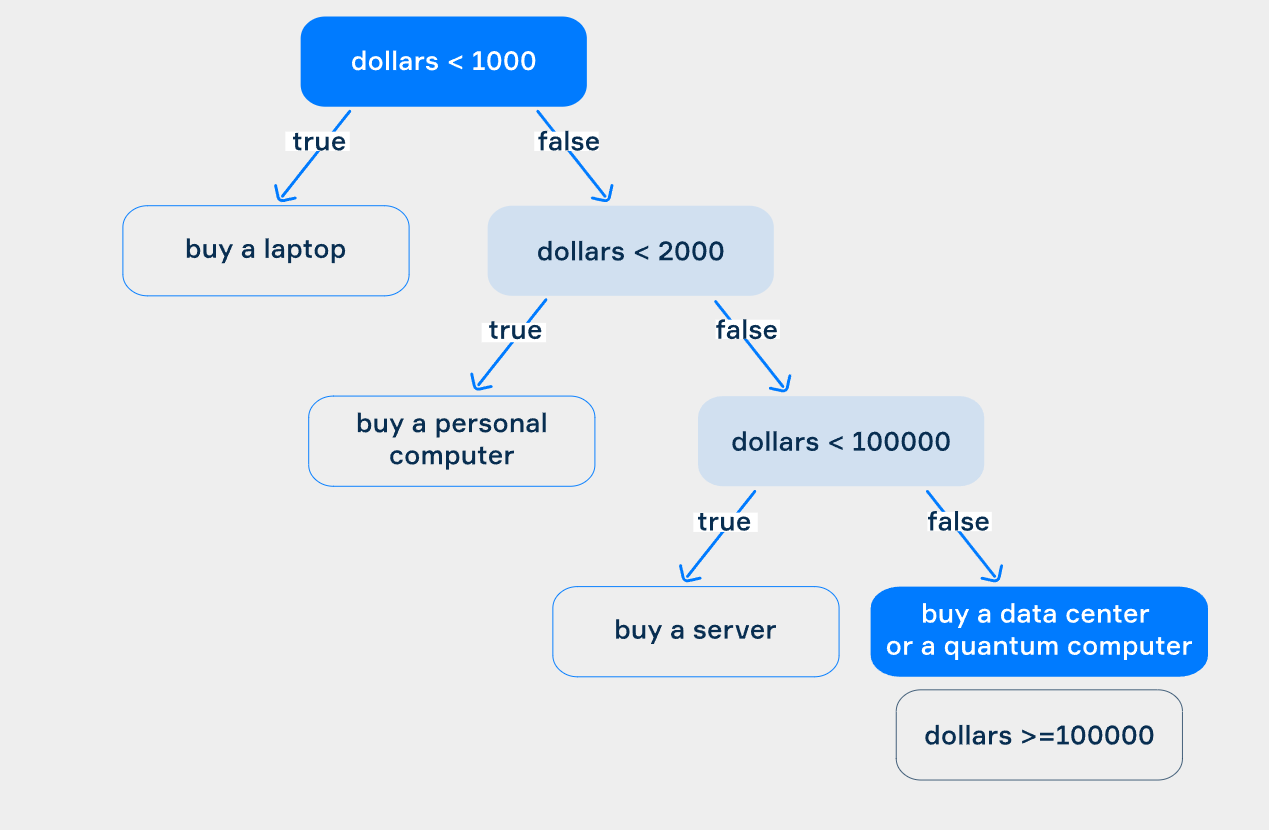
The following code outputs recommendations about what computer you need to buy depending on your budget.
long dollars = ...; // your budget

if (dollars < 1000) {
    System.out.println("Buy a laptop");
} else if (dollars < 2000) {
    System.out.println("Buy a personal computer");
} else if (dollars < 100_000) {
    System.out.println("Buy a server");
} else {
    System.out.println("Buy a data center or a quantum computer");
}
This conditional statement has four branches: dollars < 1000, dollars < 2000, dollars < 100_000 and dollars >= 100_000. For example, if the value of dollars is 10_000, it prints "Buy a server" because 10_000 is more than 2000 , which means that the first and the second conditions are false, and less than 100_000 , which means that the third condition is true.
A conditional statement with multiple branches creates a decision tree
In Java, a decision tree is a way of organizing a conditional statement with multiple branches, based on the value of a single variable.
, whose nodes consist of boolean expressions, and each branch is marked with true or false. The true-branch leads to a block of statements to be executed and a false-branch leads to the next condition to be checked. The last false-branch means “in all other cases”.
When talking about conditions, programmers often use the term “control flow statements”. Control flow is the order in which various parts of a program are executed. You will probably meet this term in our topics and on other external resources.
The picture below demonstrates such a tree for the example with computers.

 This example completes our examination of conditional statements.
One-line condition with ternary operator#
Quite often you may need to assign different values to a variable depending on a certain condition. You may do it conveniently with the help of the ternary operator In Java, a *ternary operator* is a concise way to express simple conditional statements. . It provides a compact way to express simple conditional statements. Instead of writing lengthy if-else constructs for basic conditions, you can use the ternary operator to achieve the same result in a more concise manner.
What is the ternary operator?#
The ternary operator is an operator which evaluates
In Java, evaluate refers to the process of determining the value of an expression or a variable.
a condition and chooses one of two cases to execute. It is also called the conditional operator. The operator can be considered as a form of the if-then-else statement. The ternary operator should not be confused with the conditional statement, despite their similarity. This operator can be used in places where an expression is expected.
Sometimes the ternary operator is more readable and concise than the corresponding if statement.
Let’s start learning this operator with an example. Suppose we have to find the maximum of two int variables, a and b. It is easy to write using a conditional statement:
int a = ...;
int b = ...;
int max = ...;

if (a > b) {
    max = a;
} else {
    max = b;
}
Here is what an equivalent ternary operator looks like:
int max = a > b ? a : b;This code is more concise than the code above, isn’t it?
The general syntax of the ternary operator is the following:
result = condition ? trueCase : elseCase;It includes two special symbols ? and :.
Here, the condition is a Boolean expression that evaluates to either true or false. If this expression is true, the ternary operator evaluates trueCase, otherwise elseCase is evaluated. It is important that trueCase and elseCase are expressions which can be reduced to a common type. This type determines the type of the result.
Conclusion#
The ternary operator in Java is a concise way to evaluate a condition and assign values to a variable based on that condition. It is similar to an if-else statement but can be more readable and concise in certain situations. The syntax is result = condition ? trueCase : elseCase, and it’s useful for making quick decisions in code. However, nesting ternary operators should be done with caution as it can reduce readability.